← Back to ProjectsReactNextJSJavaScriptTypeScriptAuthJS(Next Auth)MongoDBPrismaTailwind CSS Gemini AI 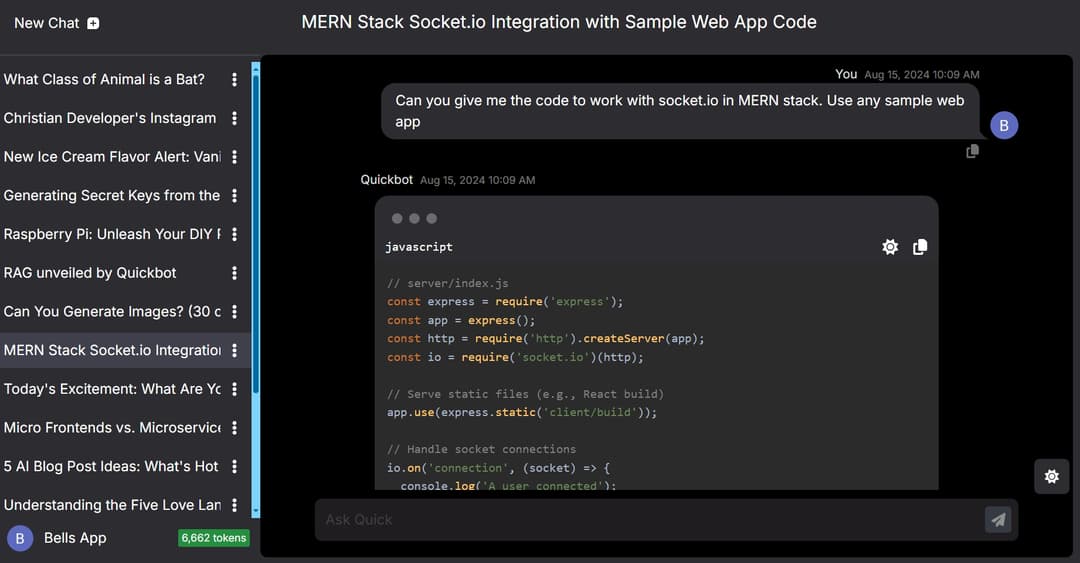
View Live Site View Code ReactNextJSJavaScriptTypeScriptAuthJS(Next Auth)MongoDBPrismaTailwind CSS Gemini AI
Quick Bot
QUICKBOT
A comprehensive chatbot application built using Next.js, TypeScript, Tailwind CSS, Next-Auth for authentication, Prisma ORM, MongoDB, Google Generative AI API for AI responses, and Redux Toolkit for state management.
Table of Contents
Introduction
This chatbot app is designed to provide intelligent responses to user queries using Google's Generative AI API. It supports user authentication, state management, and a sleek UI design.
Features
- Secure user authentication using NextAuth
- AI powered response using Google Gemini API
- Efficient state management with Redux Toolkit
- Database management using Prisma ORM and MongoDB
- Responsive UI with Tailwind CSS and Daisy UI components
- Built with TypeScript for type safety
- Automated email notifications with SendGrid
Technologies
Frontend:
- Next.js: React framework for server-side rendering and static site generation
- TypeScript: JavaScript with static typing
- Tailwind CSS: Utility-first CSS framework
- Daisy UI: Popular component library for Tailwind CSS
Backend:
- NextAuth (or Auth.js): Free and open source authentication for the web
- Prisma ORM: Next-generation ORM for TypeScript and JavaScript
- NodeJS: A JavaScript runtime environment for running JavaScript on the server
Database:
- MongoDB: NoSQL database for storing data
API:
- Google Gemini: API for generating AI responses
State Management:
- Redux Toolkit: State management for React applications
Email:
- SendGrid: Seamless email sending
App Themes
The app contains for themes - Light (the main theme), Cupcake (a variant of light), Black (the dark theme) and Dracula (a variant of the dark theme)
Installation
Prerequisites
Ensure that the following are installed:
- Node.js (v14.x or higher)
- npm (v6.x or higher)
- MongoDB (v4.x or higher)
Steps
Clone the repository
bash git clone https://github.com/OlaOluwalekan/quickbot.git cd chat-bot-appInstall dependencies
bash npm installSet up environment variables Create a .env file in the root directory and add the following variables:
env DATABASE_URL= AUTH_SECRET= GITHUB_CLIENT_ID= GITHUB_CLIENT_SECRET= GOOGLE_CLIENT_ID= GOOGLE_CLIENT_SECRET= GEMINI_API_KEY= DOMAIN= EMAIL_ADDRESS= EMAIL_PASSWORD=Run database migration
bash npx prisma migrate dev --name init npm prisma db pushStart the development server
bash npm run dev
Open http://localhost:3000 with your browser to see the result.
Usage
User Registration and Authentication
- Sign Up: New users can sign up using their email and password.
- Log In: Registered users can log in to access the chat bot features. Users can either login using credentials i.e. email and password or can make use of GitHub or Google OAuth login.
- Secure Sessions: User sessions are securely managed by NextAuth.
Chat Interface
- Chat: Users can create a chat. A chat is supposed to be like a container which holds related (may not be related depending on use) user questions and responses from Quickbot. These chat are ordered from the the most recent. When a new chat is created, the chat is named as deemed fit by Quickbot. However, users can choose to rename their chat for easy identification. Users can also delete a chat completely. Chats deleted cannot be recovered.
<u>LOOK FORWARD</u>: Upcoming feature is for users to be able to bookmark chats that are important for easy access. Also, users will be able to filter chats.
Response: A response is the result return by Quickbot after a user asked a question. Responses (and questions) are tokenized. The more the character and words in a response (and question), the more token it uses.
Markdown rendering: Responses are rendered as markdown for good presentation
Contributing
Contributions are welcome! Please follow these steps:
- Fork the repository.
- Create a new branch (git checkout -b feature/your-feature-name).
- Commit your changes (git commit -m 'Add some feature').
- Push to the branch (git push origin feature/your-feature-name).
- Open a pull request.
Please ensure your code adheres to the project's coding standards and conventions.
Contact
For any inquiries or questions, please contact:
- Name: Olalekan Bello
- Email: olalekanbello534@gmail.com
- Twitter(or X): x.com/OlaOluwalekanMi
- Website: bellsarena.com
FAQs
What is the purpose of this project? The chat bot app aims to provide users with an intuitive and interactive chat experience powered by advanced AI technologies.
How can I contribute to this project? You can contribute by forking the repository, creating a new branch for your feature or bug fix, and submitting a pull request see contributing.
How do I set up the project locally? Follow the Installation section to set up the project on your local machine.
Who maintains this project? The project is maintained by Olalekan Bello. For any queries, you can reach out via email or twitter.
Acknowledgements
Thanks to the contributors of Next.js, Tailwind CSS, DaisyUI, and Google Generative AI API. Special thanks to the open-source community for their invaluable resources and support.