← Back to Projectsnpmnodeexpressboiler plate mongoose 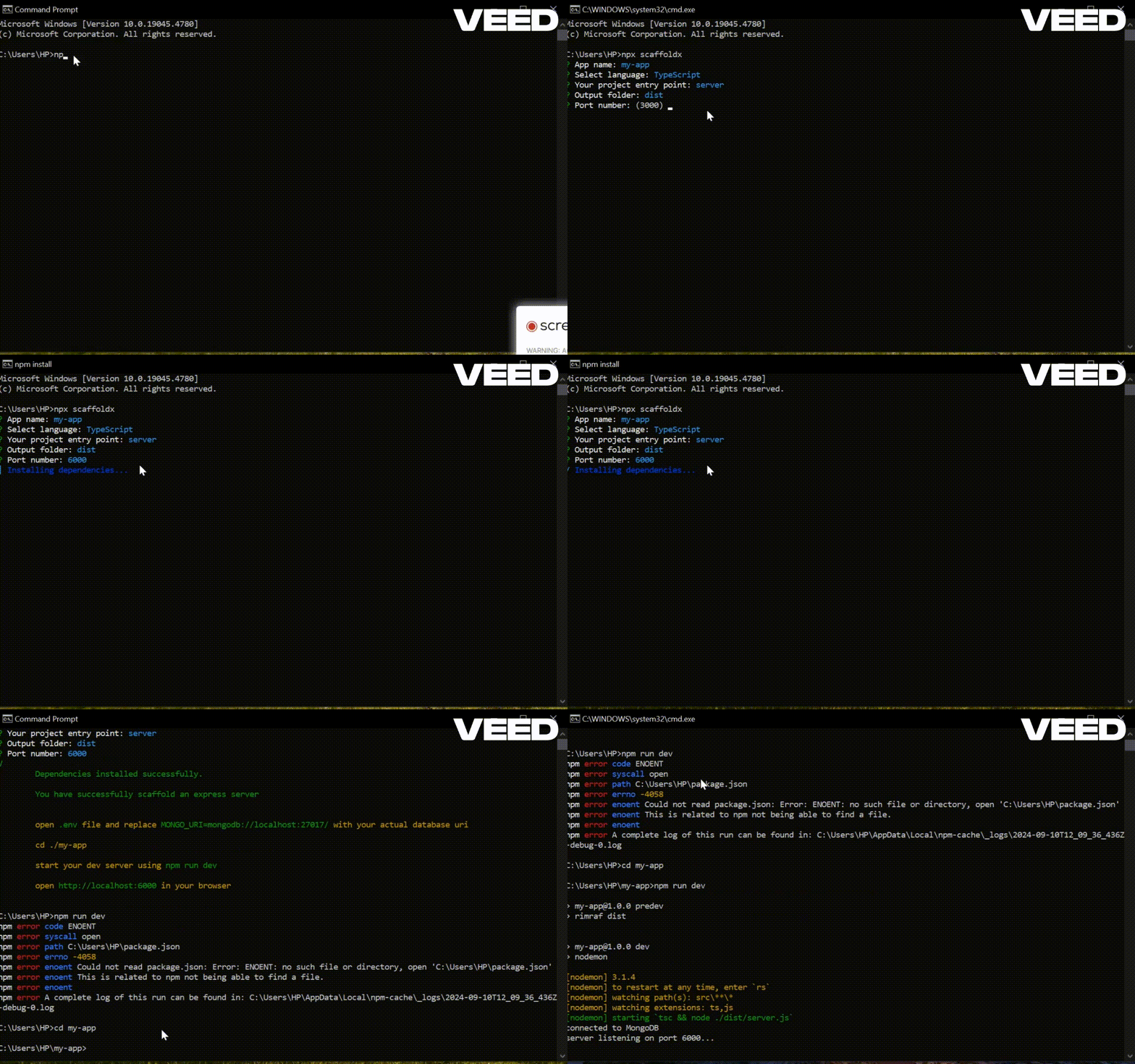
View Live Site View Code npmnodeexpressboiler plate mongoose
Scaffold X
ScaffoldX


Overview
ScaffoldX is a CLI tool that scaffolds an Express application with either JavaScript or TypeScript. The tool allows users to easily set up a project structure, choose an entry point, and configure basic project files, reducing the time spent on setting up boilerplate code for a new Express project.
Features
- Choose between JavaScript or TypeScript.
- Customize the entry point (e.g.,
server.jsorserver.ts). - Auto-generates project structure and configuration files.
- Supports the automatic installation of dependencies.
- Ready to run Express app with basic setup and configurations.
- Clean and customizable folder structure for easy development.
Installation
You can use npx to run the package directly without installing it globally:
bash npx scaffoldx
Alternatively, install ScaffoldX globally via npm:
bash npm install -g scaffoldx
Usage
Run the CLI
bash npx scaffoldxFollow the prompts
App Name: Enter your app name. The default here is
.(period) meaning the app should use the name of the current working directory. Note that if the directory is not empty, it's contents will be deleted. There is a conformation for you to confirm you want to delete.Language: Select between JavaScript or TypeScript. Use the up and down arrow keys to move the cursor between the languages.
Entry Point: Specify the entry point for your app. For example, server.js (or server.ts for typescript).
Output Folder: This option is only available if you have chosen TypeScript as your language is step 2. Choose an output folder for transpiled files. You can name it anything you like but you always want to use something like
distorbuildinstead. Also note that the/srcfolder has been reserved for your working files and hence can not be used as your output folder.Port: Set the port number for the server. Your server will run on this port (if available)
After the project is scaffolded, the tool will automatically install the dependencies.
Start developing in your newly created project!
Example
BBelow is an example of the prompt with Typescript selected as the language.
yaml    npx scaffoldx

    App name: my-app
    Language: TypeScript
    Entry point: server.ts
    Output folder: dist
    Port: 3000
Folder Structure
Once you scaffold an app with ScaffoldX, you’ll get the following folder structure:
For JavaScript
graphql    my-app/
    │
    ├── node_modules/
    ├── package.json
    ├── package-lock.json
    ├── .gitignore
    ├── .env
    ├── README.md
    ├──src/
        ├── server.js
        ├── routes/
        │   └── users.routes.js
        ├── controllers/
        │   └── users.controller.js
        ├── models/
        │   └── User.model.js
        ├── db/
        │   └── connect.js
        │── errors/
        │   ├──bad-request-error.js
        │   ├──custom-error.js
        │   ├──not-found-error.js
        │   └──unauthenticated-error.js
        └── middleware/
            ├──not-found.js
            └──error-handler.js
For TypeScript
graphql    my-app/
    │
    ├── node_modules/
    ├── nodemon.json
    ├── tsconfig.json
    ├── package.json
    ├── package-lock.json
    ├── .gitignore
    ├── .env
    ├── README.md
    ├──src/
        ├── server.ts
        ├── routes/
        │   └── users.routes.ts
        ├── controllers/
        │   └── users.controller.ts
        ├── models/
        │   └── User.model.ts
        ├── db/
        │   └── connect.ts
        │── errors/
        │   ├──bad-request-error.ts
        │   ├──custom-error.ts
        │   ├──not-found-error.ts
        │   └──unauthenticated-error.ts
        └── middleware/
            ├──not-found.ts
            └──error-handler.ts
Contributing
Contributions are welcome! Feel free to open issues or submit pull requests.
License
This project is licensed under the MIT License. See the LICENSE file for more details.